

If you want to try a VPN without risking your money, testing one for free before committing is the smart move — especially if privacy protection matters to you. Proton VPN is the only major VPN that offers a permanently free plan with no credit card required, delivering performance that rivals many paid services.
💡 New to VPNs? A VPN (Virtual Private Network) encrypts your internet traffic and routes it through a server in another country, masking your real IP address and protecting your privacy from your ISP, advertisers, and third parties.
This guide walks you through everything: how to create a free account, how to use the app, and what you get if you upgrade to paid.
Why Proton VPN? The Short Version
Proton VPN is built by Proton Technologies AG, a Swiss company founded by scientists from CERN — the same team behind ProtonMail, one of the world’s most trusted encrypted email services.
Key facts:
- Headquartered in Switzerland — protected by some of the world’s strongest privacy laws
- Outside the 14 Eyes alliance — not subject to international surveillance-sharing agreements
- Fully open-source — code is publicly audited for transparency
- Strict no-logs policy — your browsing history is never recorded, sold, or shared
The biggest differentiator: a genuinely useful free plan that never expires.
Why the free plan is the best in class:
- Truly free forever — no expiry, no credit card required
- Unlimited data — other free VPNs cap you at a few GB per month
- Paid-level security — the same encryption as the paid plan
- No ads — not even on the free tier
- No activity logs — complete anonymity
VPN Free Trial Comparison [2026]
| Service | Free Period | Data Limit | Servers | Devices | Notes |
|---|---|---|---|---|---|
| Proton VPN | Forever | Unlimited | 120+ countries | 1 | Only truly free option |
| NordVPN | 30-day money-back | Unlimited | 118 countries | 10 | Requires payment upfront |
| ExpressVPN | 30-day money-back | Unlimited | 105 countries | 8 | Fast but expensive |
| CyberGhost | 45-day money-back | Unlimited | 100 countries | 7 | Longest refund window |
| Surfshark | 30-day money-back | Unlimited | 100 countries | Unlimited | Best for households |
⚠️ The key distinction: Every service except Proton VPN requires you to enter a credit card and then request a refund. Proton VPN is the only one that is completely free from the start — no payment info ever needed.
How to Create a Free Proton VPN Account
Note: Screen designs may change over time, but the basic steps remain the same.
Step 1 — Select “Get Proton VPN Free”
Go to protonvpn.com and click “Get Proton VPN Free” on the homepage.
💡 Language tip: The site auto-detects your language. If needed, switch language at the bottom of the page (desktop) or via the menu (mobile).
Step 2 — Select “Continue with Free”
A plan selection screen will appear. You’ll see an option to get a discounted paid plan — note that selecting it will auto-renew at the regular price after the promotional period. To proceed at no cost, select “Continue with Free”.
Step 3 — Enter your email address
- Type your email address and click “Start using Proton VPN”
- ⚠️ Double-check for typos and accidental spaces — this becomes your login ID
Step 4 — Set a password
You have two options:
Option A — Use the system-generated password (recommended)
- Proton generates a strong random password for you
- Click the copy icon and save it somewhere safe (a password manager, secure notes, etc.)
Option B — Create your own password
- Use a strong combination of uppercase, lowercase, numbers, and symbols
Step 5 — Registration complete — Download the app
Once registered, you’ll be taken to a download screen. The correct version for your device (Windows, Mac, iOS, Android) is auto-detected. Click “Download” to get the app.
A confirmation email with a download link is also sent to your registered address — check your spam folder if you don’t see it.
Troubleshooting:
- No confirmation email? Check your spam/junk folder
- Forgot your password? Use “Forgot password” on the login screen
- Can’t find the download? Use the link in your confirmation email
Installing Proton VPN
Mac installation follows the same steps as Windows. For iPhone/iPad or Android, download directly from the App Store or Google Play.
On PC (Windows):
- Double-click the downloaded installer file (
.exe) - Select your preferred language
- Choose an install location — the default is fine, click “Next”
- On the component selection screen, if you only want the VPN, uncheck:
- ProtonMail
- Proton Drive
- Proton Pass
(You can always add these later if needed)
- Optionally leave “Create desktop shortcut” checked, then click “Install”
- Once complete, sign in with your email and password, then click “Get started”
💡 Login trouble? Check for typos in your email and make sure Caps Lock isn’t on.
Using Proton VPN
Once installed and signed in, using the app requires no complicated setup.
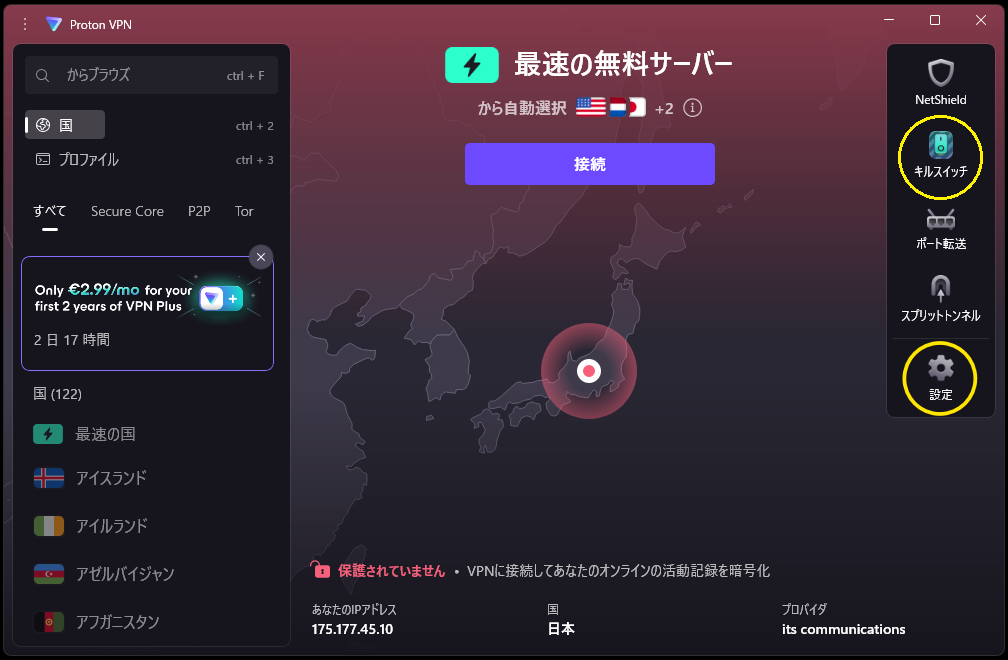
Connecting: Click the “Connect” button. The app automatically selects the best available free server. Your traffic is now encrypted and your IP address is masked.
Switching servers: Click “Change Server”. On the free plan, you cannot choose a specific country — the app selects for you. Wait about 1 minute between server changes.
Disconnecting: Click “Disconnect”.
💡 Heads up: If a regional website (such as a local streaming service or members-only site) blocks you, simply disconnect the VPN — this happens because the site detects an overseas IP address.
Settings & Options
Default settings work well for most users. Here’s what’s available on the free plan:
| Option | What it does | Recommendation |
|---|---|---|
| Kill Switch | Cuts your internet connection if the VPN drops, preventing your real IP from being exposed | Set to your preference |
| Alternative Routing | Tries alternate connection paths if the VPN is blocked (useful in restricted regions) | Leave ON |
| Protocol Selection | Choose your VPN protocol (OpenVPN, WireGuard, etc.) | Leave on Smart (auto-detect) |
Paid plan only (shows “Upgrade” on free):
| Feature | What it does |
|---|---|
| Split Tunneling | Route only specific apps through the VPN; others connect directly |
| NetShield | Block ads, trackers, and malware via DNS filtering |
| Secure Core | Double encryption routed through multiple countries |
| VPN Accelerator | Proton’s proprietary speed boost technology (up to 400% improvement) |
Free vs. Paid — Full Feature Comparison
| Feature | Free | Paid (Plus) |
|---|---|---|
| Kill Switch | ✓ | ✓ |
| No-logs policy | ✓ | ✓ |
| AES-256 encryption | ✓ | ✓ |
| Alternative routing | ✓ | ✓ |
| Protocol selection | ✓ | ✓ |
| DNS leak protection | ✓ | ✓ |
| NetShield (ad/malware blocker) | ✗ | ✓ |
| Secure Core (double encryption) | ✗ | ✓ |
| Tor over VPN | ✗ | ✓ |
| Split tunneling | ✗ | ✓ |
| VPN Accelerator | ✗ | ✓ |
| Server selection | Auto only | ✓ 120+ countries |
| Simultaneous devices | 1 | 10 |
| Available countries | ~3 | 120+ |
| Server count | Limited | 14,000+ |
| Streaming (Netflix, etc.) | ✗ | ✓ |
| P2P / Torrenting | ✗ | ✓ |
Upgrading to Paid (Proton VPN Plus)
Pricing
| Billing cycle | Price |
|---|---|
| Monthly | $9.99 / month |
| Annual | $4.99 / month |
| 2-year | $4.49 / month |
💡 Currency tip: The checkout page defaults to EUR. Switching to USD is generally cheaper.
How to upgrade
- In the app or on the website, click “Get Proton VPN” or “Upgrade”
- Select your billing cycle and click “Get VPN Plus”
- On the payment page, switch the currency to USD if it reverts to EUR
- Enter your credit card details or select PayPal, then click the payment button
⚠️ Auto-renewal: Proton VPN renews automatically. Cancel before your renewal date if you don’t want to continue (see below).
Is upgrading worth it?
The free plan’s main limitations are speed (shared servers with no selection control) and the 1-device limit. With the paid plan:
- Faster speeds — dedicated Plus servers with less congestion
- Full server selection across 120+ countries
- Up to 10 devices connected simultaneously
- Streaming access for Netflix, Amazon Prime, Disney+, and more
- NetShield blocks ads and trackers automatically
If general privacy browsing on one device is all you need, the free plan may be sufficient — indefinitely. For speed, multi-device use, or streaming, upgrading at ~$5/month (annual) is solid value.
How to Cancel Your Subscription
Cancelling stops auto-renewal. You keep access until your current period ends, then revert to the free plan.
- Sign in at protonvpn.com and click “Manage subscription”
- Scroll to the bottom and click “Continue” under “Cancel subscription”
- Click the red “Cancel subscription” button
- Select a reason from the dropdown — choose “I do not wish to share” if you’d prefer not to say — then click “Submit”
- You’re done when the Status at the top shows “EXPIRING” with an End date
Proton VPN vs. Competitors
Pricing comparison
| Proton VPN | NordVPN | ExpressVPN | |
|---|---|---|---|
| Monthly | $9.99 | $12.99 | $12.95 |
| Annual | $4.99/mo | Intro price only* | $6.67/mo |
| 2-year | $4.49/mo | Intro price only* | $4.99/mo |
| Free plan | ✅ Yes | ❌ No | ❌ No |
| Servers | 120+ countries / 14,000+ | 118 countries / 7,400+ | 105 countries / 3,000+ |
| Speed | Good | Fast | Fastest |
| Jurisdiction | 🇨🇭 Switzerland | 🇵🇦 Panama | British Virgin Islands |
* NordVPN renewal warning: NordVPN’s introductory pricing applies to the first billing cycle only. At renewal, prices typically double or triple — one of the most frequently reported complaints about the service.
Proton VPN’s unique advantages
1. The only service with a genuinely free forever plan NordVPN and ExpressVPN are paid-only. Proton VPN is the only major provider offering truly free, unlimited-data access with no trial expiry.
2. Swiss legal protection Switzerland has some of the world’s strongest privacy laws, and Proton VPN sits outside the 14 Eyes surveillance-sharing alliance.
3. Fully open-source and independently audited The code is publicly available and independently audited — a level of transparency most VPN providers don’t offer.
Speed ranking (paid plans)
- ExpressVPN — fastest, but most expensive
- NordVPN — fast and feature-rich, but watch out for renewal pricing
- Proton VPN — reliable and stable; not the fastest but consistent
Honest Assessment: What the Free Plan Is Actually Like
What works well
- Privacy protection is solid — your ISP cannot see what you’re accessing
- Connection is stable — doesn’t drop unexpectedly
- Truly unlimited data — no daily or monthly caps
- Zero ads — no banners, pop-ups, or promotions
Limitations to know about
- Slower for large downloads — shared free servers, no ability to pick a less-congested one
- Server switching cooldown — wait about 1 minute between changes
- 1 device only — can’t use phone and laptop at the same time
- ~3 server countries — US, Netherlands, and Poland (occasionally more; varies)
- Some regional sites may block you — because you appear to connect from overseas; disconnect to fix this
Who Is Proton VPN Best For?
Recommended if you…
- Want to try a VPN with zero financial commitment
- Are new to VPNs and want to get comfortable before paying
- Care about privacy and want a transparent, trustworthy provider
- Need basic security on public Wi-Fi
- Are budget-conscious but don’t want to compromise on security
May want alternatives if you…
- Need maximum speed (ExpressVPN leads here)
- Want the free plan to work across multiple devices
- Need free access to many different countries
Summary
If you’re looking for a VPN to try without any commitment, Proton VPN is the only real option. Every other major provider requires a credit card upfront.
✅ Free forever — no expiry
✅ No credit card required
✅ Unlimited data
✅ No ads
✅ Same encryption as the paid plan
✅ Swiss legal protection
Start with the free plan — there’s genuinely nothing to lose.
FAQ
Q: Is the free plan really free forever? Will I get charged after a trial period?
A: Completely free — no credit card required, no expiry. You will never be charged unless you actively choose to upgrade. Payment details are only entered at that point.
Q: Will my connection speed slow down?
A: Some slowdown is normal. For general browsing it’s barely noticeable. For large file downloads on the free plan it can be more significant, since you can’t select a faster server. The paid plan improves this substantially.
Q: If I cancel my paid plan, can I still use the free plan?
A: Yes. When your paid subscription expires, your account reverts to the free tier automatically.
Q: What’s the difference between free and paid security?
A: Core security features — AES-256 encryption, no-logs policy, kill switch, DNS leak protection, Perfect Forward Secrecy — are identical on free and paid. Paid adds Secure Core, NetShield, Tor over VPN, and split tunneling.
Q: Can I use it on iPhone and Android?
A: Yes. Dedicated apps are available for iOS, Android, Windows, macOS, and Linux.
Q: Is using a VPN legal?
A: In most countries — including the US, UK, Canada, and Australia — using a VPN is completely legal. It’s widely used for security and privacy by individuals and businesses alike.
Q: Can my ISP see that I’m using a VPN?
A: Your ISP can see that you’re connected to a VPN server, but cannot see what you’re doing beyond that — it’s encrypted. Using a VPN is entirely unremarkable.
Q: Can I use it 24/7?
A: No problem at all. Proton VPN is designed for always-on use and can be set to connect automatically when your device starts.
Q: What payment methods are accepted?
A: Credit/debit card, PayPal, and Bitcoin/cryptocurrency. Crypto offers the most anonymous payment option.
Q: Is there a money-back guarantee on the paid plan?
A: Yes — 30 days, no questions asked.
Information accurate as of April 2026. Prices and features may change — check the official site for the latest details.
Comments